Preparing datasets
Profile, browse, and edit any dataset — inside Projects & Data.
On this page
Dataset preparation lives inside Projects & Data. Use the Clean tab’s Column Profiler to see unique values and missingness for each column, the Edit tab for a spreadsheet-style grid, and Preview on the Datasets tab to see the first rows. For charts, pivots and questions in plain language, open the dataset in the Quick Start or Analytics studios.
- Column Profiler: unique values and the share missing for every column
- Clean tab: every issue the check finds, the method that would fix it and why, changeable before you apply
- Transformations such as converting a column’s type, recoding values and reshaping data
- Download a dataset as CSV, Excel, JSON, Parquet, SPSS, Stata or SAS transport (XPT), or save cleaned results as a new dataset
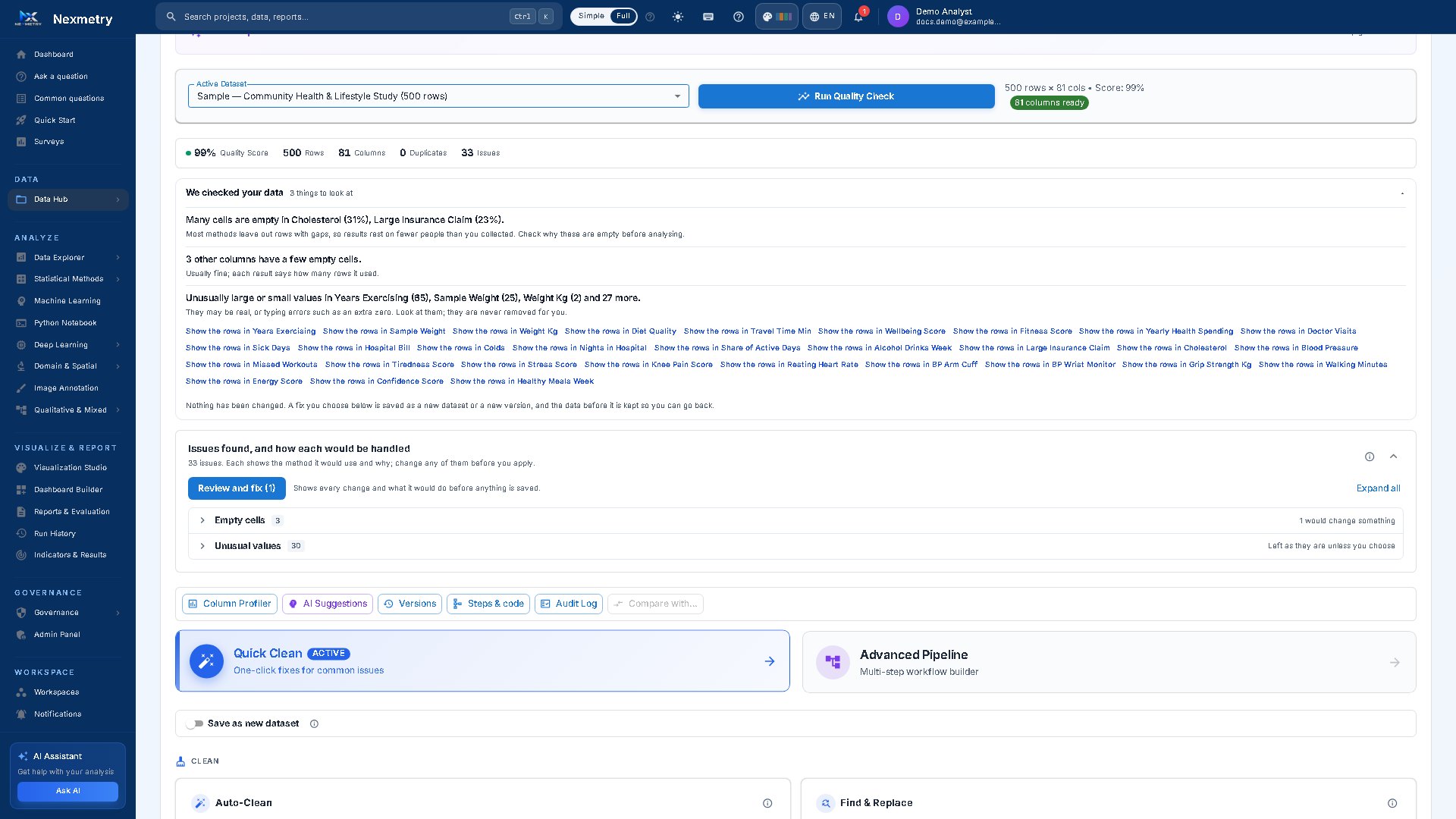
Fixing problems in your data#
- Each issue shows the method that would be used, in plain words, and why it was chosen. Change it before you apply.
- Nothing is deleted or invented by default: gaps in an identifier, a sex or ethnicity, a date or an outcome stay empty, unusual values are kept until you decide, and dates are read in the order the values prove (31/12 is day first).
- Review and fix lists every change, lets you untick or change each one, and counts what would change, cell by cell, before anything is saved.
- Show these rows lists the unusual values with their row and identifier. Answers that look like another answer written differently (M and Male) are proposed for you to approve one pair at a time.
- A plan of several steps is all or nothing: if one step cannot be applied, nothing is changed and the step is named.
Stack datasets#
Stack datasets with the same columns, on the Merge tab, puts the rows of two or more datasets one after another. Use it for files with the same kind of rows, such as one per month, region or survey round. To put two different tables side by side, matched on a column they share, use the join above it on the same tab.
- Columns are matched by name. A column that one dataset lacks is left empty for its rows.
- Before you save, a preview gives the number of rows and columns, names the columns each dataset lacks, and warns about columns that hold numbers in one dataset and text in another (they are stored as text).
- Add a column naming the dataset each row came from is ticked by default, and you can name that column.
- The result is saved as a new dataset. The datasets you stacked are not changed.
- The Python and R code on the Code (Python / R) tab rebuilds the stacked dataset from the original files.
Have a question these docs don’t answer? Email support@nexmetry.org and we’ll add a guide.